
PARKING INFORMATION
Please enter your licence plate number into a parking machine before you enter the facility.
We hope you have a lovely visit at AUT Millennium.
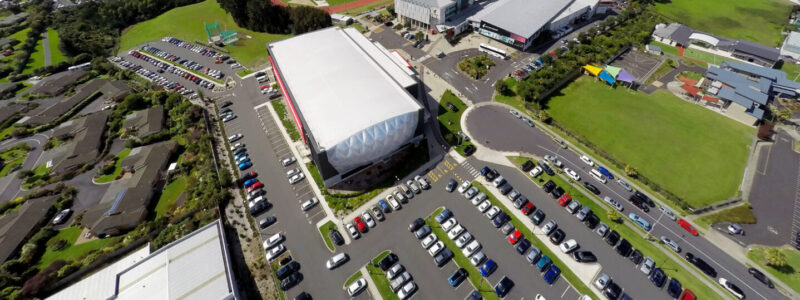
General Parking
General Parking Terms and Conditions
By using the AUT Millennium Carpark you are agreeing to the following terms and conditions.
Carpark Availability
At AUT Millennium we are proud to hold some key events throughout the year. These events may impact the availability of carparks (complimentary parking does not guarantee a carpark space for your visit). To keep up-to-date with upcoming events that may impact your visit please click here.
Hours of Operation
Paid parking operates between 7am-6pm Monday to Sunday and public holidays. Outside of these hours, parking is free.
Parking Cameras
Parking cameras are in operation which use licence plate recognition technology. This technology can check your vehicle registration number against any payments made via the payment machines or the payment app on your phone. Any breach notices which may apply will be sent directly to the address registered against the vehicle.
Complimentary parking and eligibility
Each licence plate is provided with 90 minutes of complimentary parking. To validate your complimentary parking, please enter your licence plate into one of the parking machines located in the carpark or entrance of the AUT Millennium building or National Aquatic Centre. The 90 minutes cannot be split across multiple visits per day.
There are seven machines – three in the carpark, one in each building entrance, one down the side of the AUT Millennium building and one in the Gym. Please refer to the map (which you can find in the drop-down below) for specific locations.
Machine instructions:
Enter your licence plate details, then select ‘OK’.
If you believe you will be within the allotted time frame, select ‘complete now’ OR
If you believe you need longer than the automated free time, select ‘Pay for more time’, payment method, select your extra time, and pay. If a parking machine is broken, please try the next machine. Please let a staff member know so that the machine can be fixed.
To receive an e-receipt following payment, simply go to www.my-receipt.com and enter the code you received upon entering your details in the parking machine. You will only be required to do this once, after that the system will remember your details and automatically email you electronic receipts.
What if I don’t know how long I will be here for?
If you are unsure how long you need parking, we suggest using the ParKiwi Parking App which allows you to ‘start’ and then ‘stop’ your parking session. This will avoid any issues should your visit be longer than planned.
If you’re an All Access Member, Aquatic Member or Swim School Member please see the other dropdown labelled ‘*Member Parking’.

Parking Fees & Payment Options
Parking is $3.00 per hour or a $20.00 per day flat rate. This applies if you are visiting our facility for longer than the complimentary parking period.
If you have already entered your licence plate into the system but will be visiting for longer, please re-enter your details into a parking machine to pay for your extra time.
The parking machines accept credit or debit payments.
ParKiwi App
You can also pay using the ParKiwi Parking App. Go to the Google Playstore or Apple App Store and search for ‘ParKiwi’.
Departure
You are not required to do anything before you leave the carpark, just head on your way. Thanks for visiting!
Multiple Visits Per Day
If you left before all your allocated time was used but returned to the carpark later that day, you will have to pay for your second visit. The time limit commences as soon as you enter it in the system and does not stop once you leave the carpark. Remember, you have the option of a $20 per day flat rate, and there is no charge before 7am and after 6pm.
Accessible Carparks
If you require an accessible carpark please refer to the map for accessible carpark locations. Please display the appropriate parking permit in your car and ensure you enter your licence plate into a parking machine and pay for extra time if you you are staying longer than 90 minutes.
If you entered the incorrect plate
If you are worried your licence plate has been entered incorrectly, please visit: my-receipt.com and enter the code provided by the parking machine after entering your details.
If you find that your details are incorrect, please contact Stellar, the Parking Management company.
If you do not have a code and receive a breach notice, then you may be able to appeal the notice. Instructions can be found on the bottom of your notice.
Breach Notices and Appeals
If you receive a parking breach notice and wish to appeal it, please contact Stellar, the Parking Management company. Their information is also located at the bottom of the notice.
Contact
If you have any questions about parking at AUT Millennium, please email [email protected].
Variation of Terms
*Member Parking
Member Parking Terms and Conditions
*Member/s refers to All Access, Aquatic & Swim School Members. Swim School member parking launched on Monday 8th June 2026.
By using the AUT Millennium Carpark you are agreeing to the general parking terms and conditions listed in the dropdown above as well as the following terms and conditions.
Carpark Availability
At AUT Millennium we are proud to hold some key events throughout the year. These events may impact the availability of carparks (complimentary parking does not guarantee a carpark space for your visit). To keep up-to-date with upcoming events that may impact your visit please click here.
Member Parking system:
If you have registered your licence plate into the Member Portal, at each visit to our facility scan your tag/app at either the Gym, Millennium Pool or National Aquatic Centre Receptions to start your 3 hour parking session. You will no longer be required to enter your licence plate into the parking machine unless the vehicle you bring is not registered in the Member Portal.
Who it applies to:
All Access (Gym) Members, Aquatic Members and Swim School Members.
If you are using one of our other services and you are not a *member you will need to enter your licence plate into the parking machine to validate your 90 minutes of complimentary parking. (Alternatively, please see the question on visiting twice in a day below if you utilise more than one service).
Registering your licence plate or checking that it is registered
To receive the complimentary 3 hours per day of parking, members must enter their licence plate into their Member Portal and then scan in when they visit the facility.
Step 1:
- Log in to your Member Portal here (Please note, this cannot be done through the app).
- All Access & Aquatic Members: Click on edit profile and scroll down to enter your licence plate. If you use more than one car, you can also add an additional licence plate. Swim School Members: Click on edit profile > underneath the menu change the dropdown to your child’s profile > scroll down to enter your licence plate. If you use more than one car, you can also add one additional licence plate.
- Scroll down to the bottom of the page and save your changes.
Step 2:
- Once your plate is entered in your Member Portal, when you arrive at the facility, please scan your app QR code or tag/swipe card. This will activate your 3 hours of complimentary parking for the day. If you forget to scan in, please let our team know as a parking breach notice may be issued.
Multiple Visits per day
Gym Members and Aquatic Members: Your 3 hours of complimentary parking can be split across multiple visits throughout the day. When you arrive for each visit, you must scan in to activate your parking. If your visit is going to be longer than the time you have remaining, you must pay for additional time.
Swim School Members: Each Swim School member, is entitled to 3 hours of complimentary parking per day, when you arrive make sure you scan the QR code or swipe card of the child who is swimming at that time.
If your licence plate isn’t recognised and you receive a breach
If you have already registered your licence plate in your Member Portal and you have scanned in, please email [email protected] for assitance.
Please note – if your visit is longer than 3 hours you will need to top up at the parking machine.
If you’re using a different car
- If you have two cars you can register both in your Member Portal.
- If you are using a courtesy or rental car, you will need to enter the licence plate into the parking machine when you visit.
- If you have a new car, it is your responsibility to update your licence plate in the Member Portal. The update for your licence plate/s will happen automatically, you will just need to re-scan your tag if you’ve already scanned in.
If you choose to continue using the parking machines
If you choose to continue using the onsite parking machines, you must enter your licence plate into a machine on arrival to receive 90 minutes of complimentary parking per day.
Variation of Terms
Parking Map
